
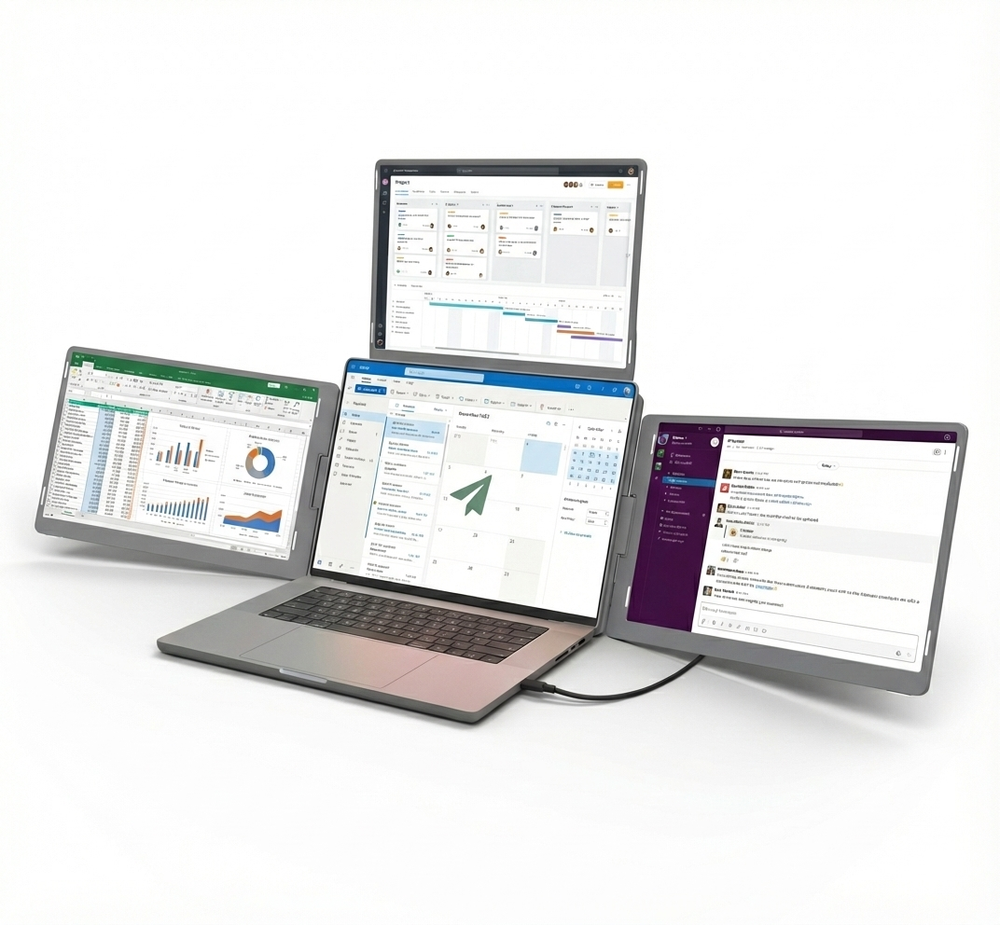
Nomad Pro S3
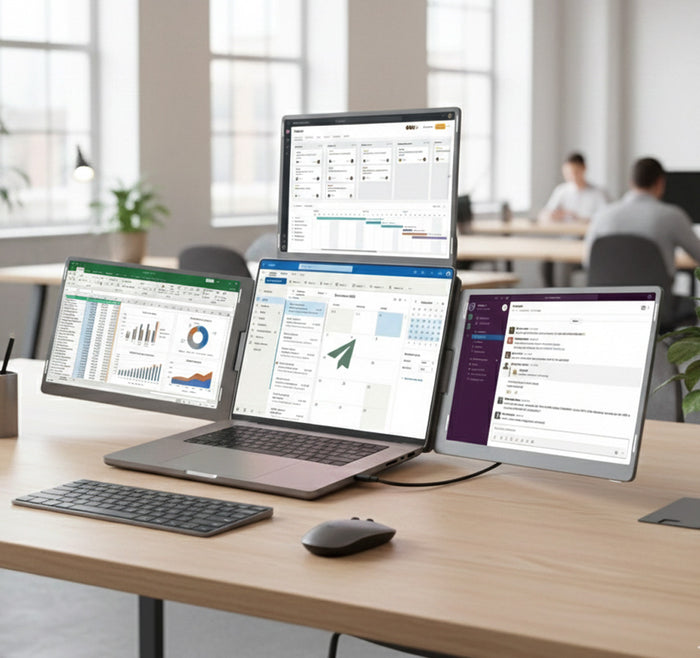
Three extra 14-inch screens around your laptop, one of them on top.
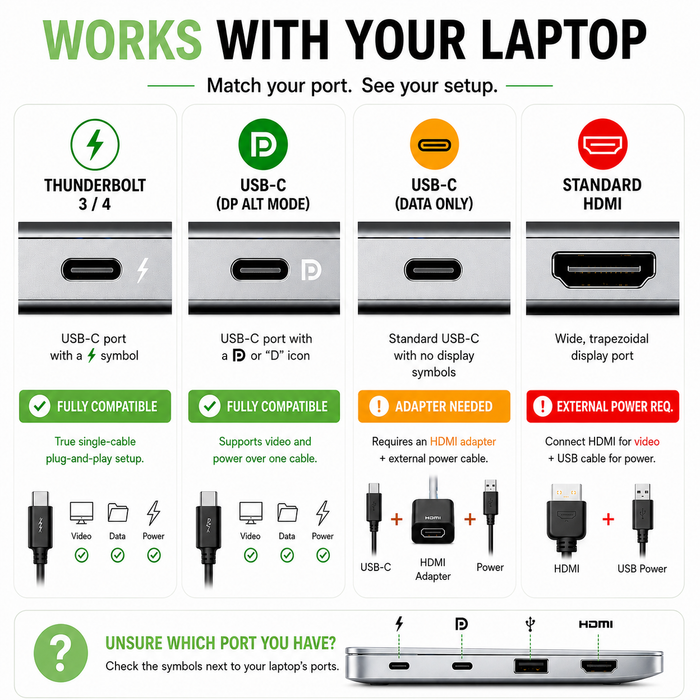
Ports it needs

- Three 14-inch screens, 1920 x 1200 each
- Fits laptops from 13 to 17.3 inches
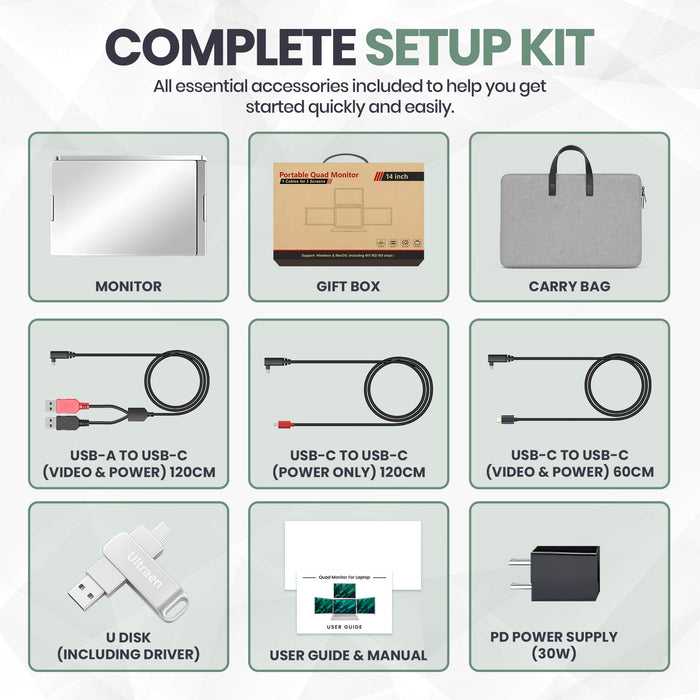
- Install the driver from the USB stick, then plug in one USB-C cable, or the dual USB-A cable. The stick and both cables are in the box.
More screen, wherever you work
Set up in three steps
See it in use
What buyers say
The details
| Screens | 3 x 14-inch |
|---|---|
| Resolution | 1920 x 1200 per screen |
| Brightness | 250 nits |
| Refresh rate | 60 Hz |
| Panel | LCD |
| Weight | 2.14 kg |
| Fits laptops | 13 to 17.3 inches |
| Power | From your laptop. Under 10 W from the port: use the power adapter for the top screen. |
| Driver | Yes: install it from the USB stick in the box before you plug in |
| Modes | Immersive, interactive, dual presentation (360°), presentation |
| Works with | Windows; Mac with M chips; Surface Pro |
| Ports needed | 1 USB-C with video and power, or 2 USB-A |
| Surface Pro | Yes |
| Warranty | 1 year |
What's in the box
- Nomad Pro S3
- USB-C to USB-C cable
- Dual USB-A to USB-C cable
- Power adapter
- Driver USB stick
- Carry case
Before you buy
Will it work with my laptop?
You need 1 USB-C port that carries video and power. No USB-C port? Use the dual USB-A cable in the box, plugged into 2 USB-A ports. Install the driver first. If your laptop's port gives less than 10 W of power (check its specs), the top screen needs the power adapter plugged into the wall. Use the quick checker above, or email support@glidemonitors.com with your laptop model and we'll tell you before you buy.
Will it fit my laptop?
It fits laptops with screens from 13 to 17.3 inches.
Does it work with a MacBook (M1, M2, M3, M4)?
Yes, it works with MacBooks with M1, M2, M3 and M4 chips, after you install the driver.
Does it work with a Surface Pro?
Yes, it works with Surface Pro, after you install the driver. If your Surface Pro charges through the same USB-C port, you'll need a pass-through charging adapter.
Does it charge my laptop? Will it drain my battery?
No, it doesn't charge your laptop. It runs on your laptop's power, so your battery runs down faster while it's on. Three screens use a lot of it. For a long session, keep your laptop plugged in. If your only USB-C port is also your charging port, you'll need a pass-through charging adapter.
Will it strain my laptop's hinge?
No. It rests on its own kickstand behind your laptop, so the weight sits on the table, not on your laptop's hinge.
Is it solid, or flimsy?
It weighs 2.14 kg. If it arrives damaged or faulty, email us and we'll fix it, replace it or refund it.
A screen isn't working. What do I do?
Try these in order. 1) Install the driver first. 2) If the top screen stays off, your laptop's port may give less than 10 W: plug the power adapter into the wall. 3) Check the cable is in a USB-C port that carries video, or use the dual USB-A cable. 4) Open your display settings and choose Extend. 5) Still stuck? Email support@glidemonitors.com with your order number, your laptop model and a short video. We reply within 24 hours.
How long does shipping take?
Orders take 5 to 10 business days, with tracking. Shipping is free. Your estimated arrival date shows next to Add to cart.
My order is late. What do I do?
Check the tracking link in your shipping email, or use Track My Order on this site. If it hasn't arrived 10 business days after you ordered, email support@glidemonitors.com with your order number. We reply within 24 hours. We chase the courier for you. If it's lost, we send a new one or refund you in full.
Can I return it?
Ask within 30 days of delivery. Returns must be unused and unopened, and fees and conditions apply: see the returns page. If it's faulty, the Australian Consumer Law covers you too, with no 30-day limit.
What's the warranty?
1-year warranty on defects in materials or workmanship under normal use. It adds to your rights under the Australian Consumer Law. It doesn't replace them. To claim, email support@glidemonitors.com with your order number and a photo or short video of the fault. Full details are on the warranty page.
Still not sure? Email support@glidemonitors.com with your laptop model.


